What it does
Everything you need on OysBio Chain, without handing your keys to anyone.
Coins, tokens and NFTs
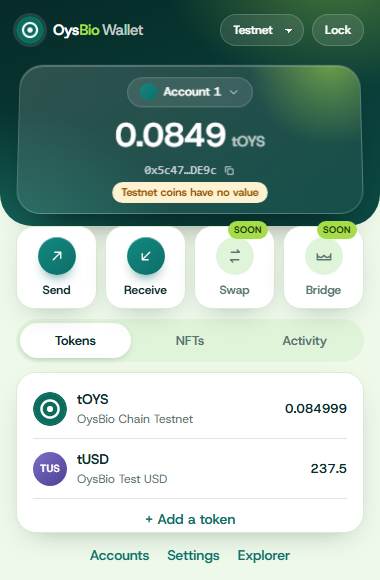
OYS, the tokens you hold and your NFTs appear automatically. Send them in a few clicks, on Mainnet or Testnet.
Full history
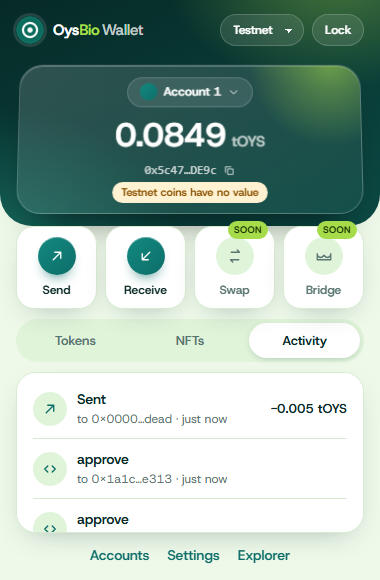
Every transaction, incoming and outgoing, with a link to the explorer.
Connect to apps
Sign in to OysBio apps. Each connection, signature and payment waits for your approval.
Plain-language warnings
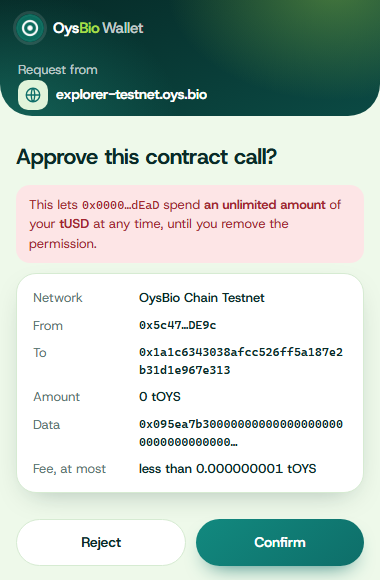
Before you sign, the wallet says what a contract call does, and flags unlimited token approvals in red.
Revoke permissions
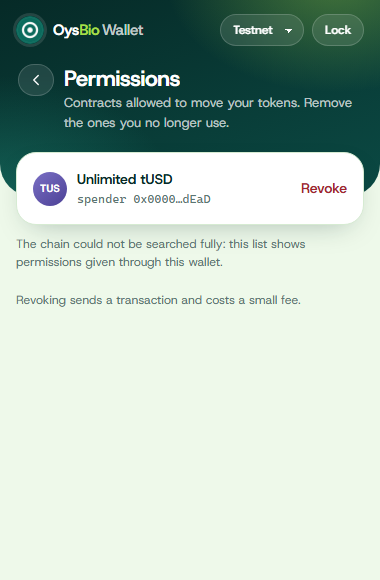
See which contracts may move your tokens and remove the ones you no longer use.
Locks itself
Encrypted with your password, locked automatically after the time you choose.
See it
Screens from the wallet on the OysBio Chain Testnet.
Install it
The wallet is not in the Chrome Web Store yet, so for now you load it yourself. It takes a minute.
- Download the wallet and unzip it into a folder you will keep, for example
Documents\OysBio Wallet. - Open
chrome://extensionsin Chrome (oredge://extensionsin Edge). - Turn on Developer mode, at the top right.
- Click Load unpacked and choose the folder you unzipped.
- Click the OysBio Wallet icon, choose Create a new wallet, and write down the 12 words on paper.
Check the download (SHA-256): 5155d8a355fde8c944068496f226d8e6932719f21c9b2d252ed4d5ed6e6ee267
Your keys, your responsibility
Stored only in your browser
The recovery phrase and keys are encrypted with AES-256 using your password. They are never sent to OysBio or anyone else.
No tracking
No ads and no analytics. To show balances and history the wallet sends your public addresses to the OysBio Chain servers. Privacy policy
Keep the 12 words safe
They are the only way to restore the wallet. If you lose them, nobody can recover your assets, including us.